# Apache
Docs liées à Apache
# Change DocumentRoot Directory
Dans **/etc/apache2/site-available/000-default.conf:**
```
Options Indexes FollowSymLinks
AllowOverride All
Require all granted
```
On redémarre le service Apache, pour que les modifications soient prises en compte
```bash
sudo service apache2 restart
```
## Liens Utiles
→ [Stack Overflow](https://stackoverflow.com/questions/5891802/how-do-i-change-the-root-directory-of-an-apache-server)
# Masquer Version Apache
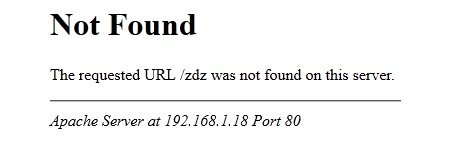
Pour masquer la version d'Apache et le nom du serveur, dans les pagse 404, les pages de navigation des répertoires web...:
[](https://www.franopit.fr/bookstack//uploads/images/gallery/2020-06/VSTgz5aYVM9ah9KV-firefox_qrvhcaFhBM.png)
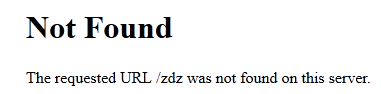
→ Ouvrir le fichier /etc/apache2/conf-available/security.conf et modifier le champ ServerSignature en "off"
→ Et le champ Server Token en "prod", à la place de "OS":
```
ServerSignature Off
ServerToken Prof
```
→ On redémarre le serveur Web, pour prise en compte de la configuration:
```bash
systemctl reload apache2
```
### Résultat:
[](https://www.franopit.fr/bookstack//uploads/images/gallery/2020-06/jfYAKmpg2p7k8qEW-firefox_lRxZYIvppR.png)
## Liens Docs
[IT-Connect - Cacher la version de son serveur web Apache2](https://www.it-connect.fr/cacher-la-version-de-son-serveur-web-apache2/)
# Configuration Apache en tant que Reverse Proxy + HTTPS
Voici la configuration pour configurer apache en tant que Reverse Proxy
Cette page page montre un exemple de configuration de reverse proxy apache
## Configuration
192.168.1.200 → Serveur Web principal + Reverse Proxy, marchine accessible depuis l'exterieur
192.168.1.201 → Serveur Nextcloud, serveur où le flux de nextcloud.franopit.fr sera redirigé, non accessible sans le proxy depuis l'exterieur
Activation module mod_proxy sur Apache:
```bash
a2enmod mod_proxy_http
```
Creation d'un fichier Zone pour l'hote **nextcloud.franopit.fr** sur le serveur Apache Proxy:
A mettre dans /etc/apache2/sites-avalable
```
# NDD (FQDN)
ServerName nextcloud.franopit.fr
# Redirection traffic http vers https
RewriteEngine on
RewriteCond %{HTTPS} !on
RewriteRule (.*) https://%{HTTP_HOST}%{REQUEST_URI}
ServerName nextcloud.franopit.fr
#Proxy vers serveur nextcloud en https
ProxyPreserveHost on
ProxyRequests on
SSLProxyEngine on
SSLProxyCheckPeerCN off
SSLProxyCheckPeerName off
SSLProxyVerify none
ProxyPass / https://192.168.10.201/
ProxyPassReverse / https://192.168.10.201/
# Certificats SSL let'sencrypt pour la configuration SSL https de l'hote
SSLEngine on
SSLCertificateFile /etc/letsencrypt/live/nextcloud.franopit.fr/fullchain.pem
SSLCertificateKeyFile /etc/letsencrypt/live/nextcloud.franopit.fr/privkey.pem
Include /etc/letsencrypt/options-ssl-apache.conf
Header always set Strict-Transport-Security "max-age=15552000; includeSubDomains"
SSLProtocol all -SSLv2 -SSLv3
```
#### Detail des options:
- SSLEngineOn, SSLCertificateFile, SSLCertificateKeyFile : paramétrage du SSL, avec le certificat et la clé
- SSLProxyEngine : activation du mode Proxy en SSL
- SSLProxyCheckPeerCN et SSLProxyCheckPeerName : permet de ne pas vérifier le CN et le nom du serveur distant
- SSLProxyVerify : pas de vérification du serveur distant
- SSLProxyMachineCertificateFile : concaténation de la clé et du certificat de la machine (pas nécessaire si on désactive les vérifications)
- ProxyPass et ProxyPassReverse : il s'agit du paramétrage "standard" du mode reverse proxy
- ProxyPreserverHost On : garde le nom DNS du reverse proxy (sinon on récupère l'adresse IP du serveur cible)
Redémarrage service apache pour appliquer les modifications:
```bash
systemctl restart apache2
```
## Docs
→ [Apache : reverse proxy https ](https://www.vincentliefooghe.net/content/apache-reverse-proxy-https)
→ [IT-CONNECT - Apache Mise en place d’un Reverse Proxy Apache avec mod_proxy](https://www.it-connect.fr/mise-en-place-dun-reverse-proxy-apache-avec-mod_proxy/)
# Redirection apache
Redigirer example.org vers www.example.org:
```
RewriteEngine On
RewriteCond %{HTTP_HOST} !^www\. [NC]
RewriteRule ^(.*)$ https://www.%{HTTP_HOST}%{REQUEST_URI} [R=301,L]
```
## Liens
[Stackoverflox → apache redirect from non www to www](https://stackoverflow.com/questions/1100343/apache-redirect-from-non-www-to-www/1100363#1100363)
# Set http 2 with php
For setup http/2 on apache with php installed, set apache with php-fpm
For example on debian server:
```bash
apachectl stop
apt-get install php7.3-fpm # Install the php-fpm from your PHP repository. This package name depends on the vendor.
a2enmod proxy_fcgi setenvif
a2enconf php7.3-fpm # Again, this depends on your PHP vendor.
a2dismod php7.3 # This disables mod_php.
a2dismod mpm_prefork # This disables the prefork MPM. Only one MPM can run at a time.
a2enmod mpm_event # Enable event MPM. You could also enable mpm_worker.
apachectl start
```
## Source
→ [How to enable HTTP/2 support in Apache](https://http2.pro/doc/Apache)